Video mock interviews have become essential for placement preparation. With more companies conducting first-round interviews online, students need practice in this format. Here's how to run an effective video mock interview program.
Why Video Mock Interviews Matter
The shift to remote hiring has made video interviewing skills critical. Students who only practice in-person interviews struggle with:
- Managing their on-screen presence
- Dealing with technical issues calmly
- Maintaining engagement without physical cues
- Creating a professional background setup
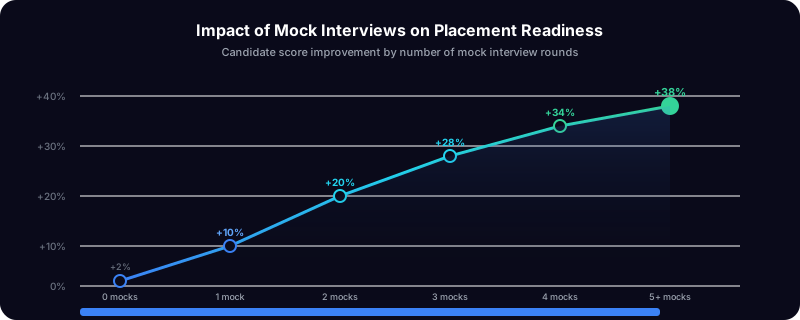
The data: Students who complete at least 3 video mock interviews have 40% higher success rates in actual video interviews.
Setting Up Your Mock Interview Program
1. Define the Format
Decide what type of interviews you'll conduct:
| Format | Duration | Use Case |
|---|---|---|
| Screening | 15-20 min | Practice for HR rounds |
| Technical | 30-45 min | Practice for technical evaluations |
| Behavioral | 30 min | Practice for cultural fit interviews |
| Case Study | 45-60 min | Practice for consulting/analytics roles |
Most placement cells benefit from focusing on screening and behavioral formats first.
2. Prepare Your Trainers
Not every trainer is automatically good at conducting video interviews. Provide guidance on:
- How to create a professional video setup
- Best practices for giving feedback on video presence
- Common video interview mistakes to watch for
- How to simulate real company interview conditions
3. Create a Question Bank
Standardize your questions to ensure consistency across trainers:
HR/Screening questions:
- Tell me about yourself
- Why are you interested in this role?
- What are your strengths and weaknesses?
- Where do you see yourself in 5 years?
Behavioral questions (STAR format):
- Tell me about a time you faced a challenge
- Describe a situation where you worked in a team
- Give an example of when you showed leadership
Technical questions: These vary by discipline, but create a shared repository.
Running the Interview
Before the Interview
Send students a checklist:
- Test your camera and microphone
- Ensure stable internet connection
- Set up a clean, professional background
- Dress professionally (at least upper body)
- Have a glass of water nearby
- Close unnecessary applications
- Join 5 minutes early
During the Interview
Trainer responsibilities:
- Start with a brief warm-up to ease nerves
- Observe body language, eye contact, and presence
- Note specific quotes and examples (for feedback)
- Time responses (ideal: 1-2 minutes per question)
- Leave time for student questions
What to evaluate:
- Communication clarity
- Confidence and composure
- Answer structure (especially STAR method)
- Technical accuracy (for technical interviews)
- Professional presence on video
After the Interview
Immediate feedback is crucial. Cover:
- What went well (be specific)
- What needs improvement (be constructive)
- One thing to focus on for next time
Record and share the interview (with permission) so students can self-review.
Scoring Mock Interviews
Use a consistent rubric:
| Criterion | Score 1-10 | Weight |
|---|---|---|
| Communication | 25% | |
| Technical Knowledge | 25% | |
| Problem Solving | 20% | |
| Video Presence | 15% | |
| Professionalism | 15% |
Students should aim for an overall score of 7+ before interviewing with companies.
Common Student Mistakes
Watch for these issues:
- Looking at themselves instead of the camera: Eye contact means looking at the camera, not the screen
- Rambling answers: Responses should be 1-2 minutes, structured, and specific
- Poor lighting: Face should be well-lit, not backlit
- Distracting background: Busy backgrounds or movement pulls focus
- Forgetting to mute notifications: Nothing kills momentum like a WhatsApp ping
Scaling Mock Interviews
For large batches, individual interviews don't scale. Consider:
Panel interviews: One trainer, 2-3 students taking turns Group discussions: Practice for GD rounds, 6-8 students per session Peer interviews: Train students to interview each other, then review recordings
Technology Recommendations
The right tools make mock interviews smoother:
- Video platform: Must support recording and easy joining (no downloads)
- Scheduling: Self-booking reduces coordination overhead
- Feedback: Digital forms are faster than paper
- Storage: Recordings should be accessible but secure
PlacementPilot includes built-in video interviews with one-click room creation, automatic recording, and integrated feedback—designed specifically for mock interview workflows.
Take Action
Video mock interviews aren't optional anymore. Build them into your placement preparation program starting today.
Need help getting started? Book a demo to see how PlacementPilot makes mock interviews effortless. Or start your free trial and schedule your first mock interview in minutes.
Related: Understanding Placement Readiness Metrics | How to Improve Campus Placement Rate | Video interview features →