You're managing 400 candidates across 3 departments. Your "system" is an Excel sheet shared on WhatsApp. The Dean wants placement readiness numbers by Friday. Sound familiar?
Here's the good news: you don't need budget approval to fix this.
The Problem With Excel
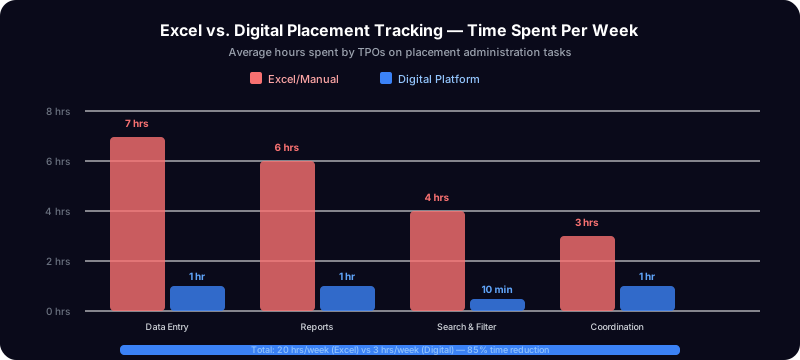
Excel isn't bad. It's just not designed for what you're doing:
- No real-time view — You update the sheet, share it, someone opens the old version
- No readiness tracking — You know scores exist somewhere, but calculating "who's ready" takes hours
- No audit trail — Who updated what, when?
- No candidate portal — Students ping you on WhatsApp asking "what's my status?"
- No batch comparison — Is CSE doing better than ECE? Manual pivot tables every time
The answer isn't "buy expensive software." The answer is using the right free tools.
Option 1: Google Sheets + Forms (Free, Manual)
This is the simplest upgrade from Excel:
- Create a Google Sheet with candidate data
- Use Google Forms for assessment input
- Build a dashboard tab with QUERY formulas
- Share with view-only links
Time to set up: 2-3 hours Ongoing effort: High — manual data entry, formula maintenance Best for: Under 50 candidates
The Limitation
Google Sheets breaks down at scale. With 200+ candidates, formulas slow down, the sheet becomes unwieldy, and you're still doing manual work.
Option 2: PlacementPilot AI Free Tier (Free, Automated)
We built a free tier specifically for TPOs who need more than Excel but can't justify a software budget:
What you get for free (forever):
- 100 candidates
- 2 staff users
- 1 batch, 2 departments
- Assessment scoring (mock interview, GD, presentation)
- Readiness dashboard with real-time metrics
- Resume uploads
- Candidate profiles with timeline
- CSV/XLSX import
What takes 10 minutes:
- Sign up at placementpilot.ai
- Create your organization
- Import candidates from your existing Excel (CSV upload)
- Done — your dashboard now shows readiness metrics
Time to set up: 10 minutes Ongoing effort: Low — data flows through the system automatically Best for: 50-100 candidates (free), up to 2000 (paid)
Option 3: Notion / Airtable (Free Tier, DIY)
If you're tech-savvy, you can build a placement tracker on Notion or Airtable:
- Create a candidates database with fields for scores, status, department
- Build views for "ready", "needs work", "not started"
- Use rollups for department averages
Time to set up: 4-6 hours Ongoing effort: Medium — manual but organized Best for: Tech-comfortable TPOs with under 100 candidates
The Limitation
No assessment workflows, no readiness calculations, no candidate-facing portal, no interview scheduling. You're building a database, not a placement system.
The Decision Framework
| Criteria | Google Sheets | PlacementPilot Free | Notion/Airtable |
|---|---|---|---|
| Setup time | 2-3 hours | 10 minutes | 4-6 hours |
| Candidates | Unlimited (slow) | 100 | 1000+ (Airtable) |
| Readiness metrics | Manual formulas | Automatic | Manual |
| Assessment tracking | Manual | Built-in | Manual |
| Candidate portal | No | Yes | No |
| Cost | Free | Free | Free tier |
| Scales beyond 200 | Poorly | Upgrade to paid | Depends |
My Recommendation
Start with PlacementPilot AI's free tier. Here's why:
- It takes 10 minutes, not hours
- You get readiness metrics without writing formulas
- When you outgrow 100 candidates, the upgrade is seamless
- Your data doesn't live in a random Google Sheet that someone might accidentally edit
If you're currently on Excel and the Dean is asking for numbers, this is the fastest path to "here's the dashboard, sir."
Getting Started
- Go to placementpilot.ai/signup
- Create your organization (takes 30 seconds)
- Go to Candidates → Import → Upload your Excel/CSV
- Check your Dashboard — readiness metrics are already calculating
Related: Best Placement Management Software India | 5 Signs Your Placement Cell Needs a Digital Upgrade | See all features →
No credit card. No sales call. No IT department needed.